How to Cut Mobile Skins Using a Vinyl Cutting Machine (Complete Guide)
The demand for mobile skins has grown dramatically in the last few time. A lot of smartphone owners prefer elegant skins that allow them to customize their phones as well as protect their devices from scratch marks.
In order to create professional-grade mobile skins to create professional-quality mobile skins, the cut-off machine is commonly employed. These machines permit the cutting of vinyl sheets precisely in line with the design of the phone.
But, precise cutting can only be accomplished with portable skin templates are employed.
The AR Mobile Skin, AR Mobile Skin, professional templates for mobile skins can help companies and designers create skins with precision for a wide range of smartphones.
This document shows how mobile skins may be cut step-by-step with a cutting machine for vinyl.
What Is a Vinyl Cutting Machine?
Vinyl cutting machines are designed to cut thin material like vinyl sheets in specific shape.
The machine scans the vector path of the design files and cuts precise outline.
They are extensively used in various industries, including:
- Mobile skin production
- Creation of stickers
- Sign-making
- Custom decals
If mobile skin templates can be used in conjunction with cutting machines, exact skins are easily made.
Popular Vinyl Cutting Machines for Mobile Skins
A variety of cutting equipment is commonly employed for mobile skin manufacturing.
The most popular machines are:
- Cricut Maker 3
- Silhouette Cameo 4
They are renowned for their efficiency and precision. to using.
Check out: Best Cutting Machines for Mobile Skin Business
Tools Required for Cutting Mobile Skins
Before beginning the cutting process, various tools need to be prepared.
1. Mobile Skin Template File
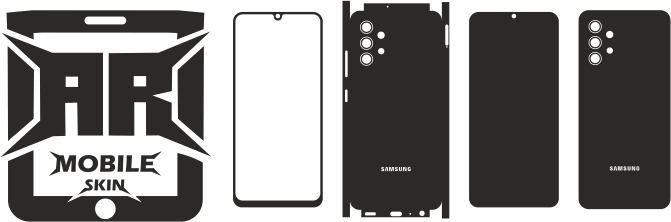
The design template gives an exact sketch of the mobile.
Templates can be used to create camera cutouts as well as buttons positions.
2. Vinyl Sheet
Vinyl that is of premium quality is typically manufactured by firms like 3M as well as Avery Dennison.
3. Cutting Machine
A cutting machine for vinyl is needed for cutting the design precisely.
4. Cutting Mat
The sheets of vinyl are placed on a cutting mat in order to make sure it stays stable throughout cutting.
5. Weeding Tools
Tools for weeding help to remove any the excess vinyl left after cutting.
Step 1: Download the Mobile Skin Template
The first step is to download the appropriate template for your device model.
The templates contain exact measurements as well as cut lines that are required by the machine.
The use of accurate templates guarantees that the skins are perfectly fitted.
Also read: Complete Guide to Mobile Skin Templates for the Beginner
Step 2: Open the Template in Cutting Software
When the template has been downloaded and opened, it must be loaded within the software for cutting machines.
Many machines are able to use vector file formats like:
- SVG
- DXF
The program allows the layout file to be created to cut.
Step 3: Prepare the Vinyl Sheet
Prior to cutting the vinyl sheet needs to be placed on a cutting mat.
The sheet must be press tightly to stop moving during cutting.
A proper placement can ensure precise outcomes.
Step 4: Adjust Cutting Machine Settings
The settings of the cutting machine should be adjusted according to the type of vinyl.
The most important settings are:
- Blade depth
- The cutting pressure
- Speed reduction
The test cuts must be done prior to making the final cut.
Step 5: Send the Design to the Cutting Machine
After the settings have been set after which the design file can be transferred to the machine for cutting.
The machine adheres to cutting lines cut by the template, then cuts out the vinyl according to those lines.
It usually only takes several minutes.
Step 6: Weed the Vinyl Skin
Once the cutting process is complete the excess vinyl has to be disposed of.
The process is referred to as Weeding.
In this stage:
- The excess vinyl can be removed
- The skin’s shape is only a little different.
Be careful to remove small pieces from cuts in the camera.
Step 7: Prepare the Skin for Installation
When the skin is cleaned after which it’s all set to be applied on the device.
In the days prior to installing, the phone’s surface needs to be cleaned to eliminate any dust or oils.
Proper preparation ensures better adhesion.
Benefits of Using a Cutting Machine
Vinyl cutting machines provide several advantages.
High Precision
The machines follow vector paths to make precise cutting.
Faster Production
Skins are produced in a short time.
Professional Results
A clean and well-defined edge improves the product’s quality.
Reduced Material Waste
Cutting with precision reduces wastage of vinyl.
Common Mistakes When Cutting Mobile Skins
Many beginners make cut-off mistakes.
Common problems are:
- Incorrect blade depth
- Utilizing low-quality vinyl
- Poor template accuracy
- Improper mat placement
This can result in bad-quality skins.
Making sure that the templates are accurate and have proper machine settings can help avoid this issue.
Tips for Better Cutting Results
Several tips can help improve cutting results.
- Always run test cuts prior to the production
- Choose high-quality vinyl material
- Clean the cutting mat
- Replace dull blades regularly
These tips will help to ensure consistency in quality.
Conclusion
The cutting of mobile skins by an automated vinyl cutter can be a great way to create custom phone skins. By using precise cell phone skin templates, the vinyl sheets are made precisely in order to fit the specific model of phone.
Utilizing professional equipment using high-quality products, top-quality materials and proper machine settings, novices and professionals can create high-end mobile skins.
With the trend of smartphone customization continuing to expand and expand, cutting vinyl machines are a must-have tool in the field of mobile skin.
FAQs
What is the machine that is used to slice mobile skins?
Machines for cutting vinyl, such as Cricut Maker 3 and Silhouette Cameo 4 are used extensively.
Are templates required for cutting mobile skins?
Yes. Templates offer the exact outline necessary for cutting precisely.
What material is used for mobile skins?
Vinyl sheets are commonly utilized to make mobile skins.
Can beginners use vinyl cutting machines?
Yes. A lot of cutting equipment is designed to be user-friendly.
How long does it take to cut a mobile skin?
Many mobile skins are made in only a few minutes based on the device.