How to Make Mobile Skin Templates using Cricut (Step-by-Step Instructions)
Making mobile skin templates on the Cricut machine is among the most effective ways to create precise and high-quality vinyl skins. When it is done right, precise cutting and perfectly fitting result can be made consistently.
By using high-quality data taken from AR Mobile Skin, the process gets much faster and reliable.
This guide will show you the ways mobile skin templates can be made using Cricut machines with ease and in a beginner-friendly method.
What Is Required Before Starting?
Prior to starting the process, all the necessary equipment should be ready.
Tools required:
- Cricut machines (e.g., Cricut Maker 3 or Cricut Explore Air 2)
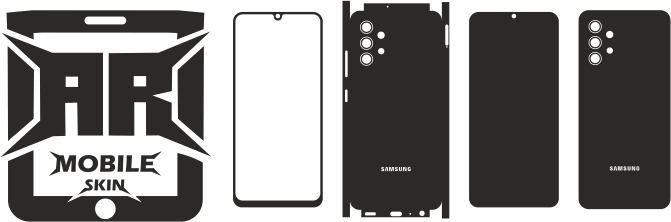
- Templates for mobile skins
- Vinyl sheet
- Cutting mat
- Tool for Weeding
- Computers with design software
A well-planned workflow can be made smooth.
Step 1: Download the Mobile Skin Template
The appropriate template must be chosen in accordance with the model of phone.
Important points:
- Ensure accurate model selection
- Make use of high-quality templates
- Make sure that the format of your file is compatible
Accurate templates help achieve perfect results.
Check out the following article: Benefits of Using Mobile Skin Templates
Step 2: Upload Template to Cricut Software
The templates should be loaded into the Cricut’s software of official use:
- Cricut Design Space
Steps:
- Open Design Space
- Click on “Upload”
- Import the template document.
- It should be placed on the canvas
Design is available to be set up.
Step 3: Adjust Template Size and Position
The template must be checked prior to cutting.
Ensure:
- Correct dimensions
- Proper alignment
- There is no need for undesirable scaling
A mistake in sizing could affect the fit.
Step 4: Prepare the Vinyl Sheet
The vinyl should be laid on the mat for cutting.
Tips:
- Make sure that you align the vinyl correctly to grid lines
- Eliminate bubbles and dust
- Make sure you press the mat down firmly
This assures precise cutting.
Step 5: Select Material Settings
Proper material settings must be set.
Common setting:
- Type of material (vinyl)
- Blade tension
- The speed of cutting
The testing of a small portion is highly recommended.
Step 6: Start the Cutting Process
After everything is in place then the cutting process will be initiated.
Cricut machine Cricut machine can:
- Use the template to follow
- Cut the vinyl with precision
- Form clean lines
It is automated and effective.
Step 7: Remove the Cut Vinyl
Once cut, mat should be taken off the mat in a careful manner.
Important:
- Do not stretch the vinyl.
- Take care to handle the item with care.
Proper removal prevents damage.
Step 8: Weed the Design
Weeding refers to the procedure to remove any extra vinyl.
Tools:
- Pin or tool for weeding
Steps:
- Take out any pieces that aren’t needed
- Be sure to clean the edges
This stage helps to prepare an ideal skin.
Step 9: Inspect the Final Cut
The design that is completed should be inspected.
Ensure:
- Clean edges
- Cutouts that are precise
- There are no missing parts
The importance of quality checking.
Common Mistakes to Avoid
Beware of these pitfalls when you use template templates using Cricut:
- Incorrect settings for size
- Templates that are not of high-quality
- Poor vinyl placement
- Material settings that are not correct
The prevention of these mistakes can improve results.
Tips for Better Results
You can achieve better results with the help of simple guidelines.
- Make use of premium vinyl
- Keep blades sharp
- Check the settings prior to full cutting
- Utilize accurate templates
Consistency improves quality.
Why Templates Are Important for Cricut
The use of templates is essential to ensure precise cutting.
They can help:
- Ensure correct dimensions
- Enhance align
- Reduce errors
With no templates, exact results can be hard to achieve.
Benefits of Using Cricut for Mobile Skins
Cricut models have many advantages.
- Easy to use
- High-precision
- Production speed is rapid
- For professionals and beginners
They are used extensively in the industry of mobile skins.
Conclusion
Making mobile skin templates using an Cricut machine is a straightforward and successful process, provided it is done correctly. When you are prepared properly and using precise templates and choosing the appropriate options, high-quality results are possible.
Cricut equipment makes the creation process quicker and more efficient and efficient, which is why they are ideal for beginners as well as businesses. Through practice and perseverance perfection, mobile skins are able to be designed every single time.
FAQs
Are Cricut machines be used with Mobile skin template templates?
Yes. Templates are easily accessible using Cricut Design Space.
Do I need special software for Cricut?
Yes. Cricut Design Space is required.
What material is best for cutting skins?
Vinyl is one of the most widely employed material.
Why is my cut not accurate?
This could be because of improper settings or poor quality templates.
Can beginners use Cricut machines?
Yes. Cricut is a great machine for beginners.