Samsung Galaxy A26 5G Skin Template: Personalized Vinyl Patterns and Cutting Instructions
Smartphone customization allows users to create devices that reflect their individual style. One way to achieve this without replacing the phone is by applying custom vinyl skins. For designers and vinyl-cutting businesses, using an accurate, model-specific cutting template is essential for achieving consistent results.
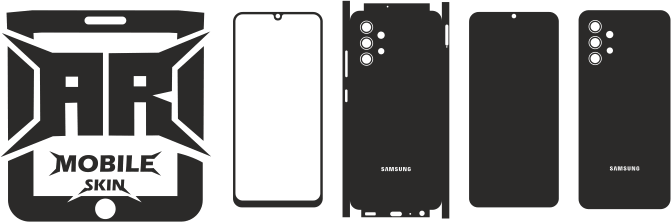
The Samsung Galaxy A26 5G skin template is designed for customization projects involving this particular smartphone model. It provides a digital layout that designers can use to create decorative finishes, personalize the phone’s appearance, and prepare vinyl-cutting artwork.
Whether you operate a vinyl customization business or simply enjoy creating personalized designs, understanding the template and preparing the artwork correctly can help streamline your workflow.
This guide covers Samsung Galaxy A26 5G skin customization, design options, vector preparation, vinyl materials, and important considerations for producing a custom phone skin.
Why Choose a Samsung Galaxy A26 5G Model-Specific Template?
Samsung manufactures smartphones across several product families. Even models with similar names can have different body designs, camera arrangements, and dimensions.
A cutting file designed for another Galaxy A-series smartphone should not automatically be used for the Galaxy A26 5G.
A model-specific template allows designers to work with the intended device layout instead of relying on an approximate shape.
Before starting a project, check the following details:
- Exact device model.
- Overall template dimensions.
- Camera opening arrangement.
- Position of relevant cutouts.
- Intended coverage areas.
- File formats supported by your design software.
These checks help minimize errors when preparing a custom vinyl design.
What Can You Create Using a Samsung Galaxy A26 5G Skin Template?
A digital cutting template provides a foundation for creating different visual styles. Here are some popular design possibilities.
1. Minimalist Phone Skins
Minimalist designs focus on simple colours, clean shapes, and limited decorative elements.
Popular ideas include:
- Matte black designs.
- Grey and white combinations.
- Solid pastel colours.
- Simple geometric patterns.
- Minimal line illustrations.
These designs are ideal for users who prefer a clean and understated appearance.
2. Carbon-Fibre-Inspired Designs
Carbon-fibre-inspired graphics are popular in gadget and automotive customization.
Designers can create suitable patterns and position them within the phone’s template layout. The final texture and appearance depend on the vinyl material selected.
3. Personalized Printed Artwork
Printed vinyl allows designers to use original illustrations, photographs, patterns, and branded artwork.
Possible design ideas include:
- Abstract artwork.
- Nature-inspired patterns.
- Gaming-themed graphics.
- Personalized initials.
- Business branding.
- Custom colour combinations.
Always verify the licensing or authorization of third-party images and logos before using them in commercial projects.
4. Decorative and Brushed-Metal Finishes
Brushed-metal-inspired artwork can give a smartphone a modern, technical appearance.
Other decorative possibilities include:
- Marble patterns.
- Wood-grain graphics.
- Metallic effects.
- Vibrant abstract designs.
- Custom two-tone combinations.
The final appearance depends on the artwork and vinyl material selected for production.
Understanding the Camera and Device Layout
The camera area is one of the most important parts of a smartphone skin design.
If the camera module is not considered during artwork preparation, the finished design may appear misaligned or interfere with the intended openings.
When creating Samsung Galaxy A26 5G artwork, carefully examine the camera arrangement shown in the selected template.
Pay attention to:
- Camera opening positions.
- Opening dimensions.
- Spacing between cutouts.
- Flash positioning.
- Outer design boundaries.
Do not assume that another Samsung model has the same camera configuration. Always verify the layout using the specific Galaxy A26 5G template before cutting.
Preparing Samsung Galaxy A26 5G Artwork
Once you have selected the correct template, you can begin preparing the visual design.
A systematic workflow helps keep the original cutting geometry separate from the decorative artwork.
Step 1: Open the Template
Open the downloaded file in compatible vector-editing software.
Check that the file opens correctly and all design elements are visible.
Step 2: Examine the Cutting Paths
Identify the relevant openings, camera cutouts, and outer outline.
Avoid modifying the original geometry unless you have a specific reason and have verified the required dimensions.
Step 3: Create the Artwork
Prepare your selected colours, textures, images, and patterns on a separate layer.
Keeping the artwork separate makes it easier to modify the visual design without changing the original cutting layout.
Step 4: Position the Design
Place your artwork within the intended skin area.
Make sure important visual elements do not extend beyond the cutting boundaries or become hidden by openings.
Step 5: Inspect the Completed Layout
Review the complete design at an appropriate zoom level.
Check the alignment, camera openings, outer margins, and overall appearance before exporting the cutting file.
Step 6: Test Before Final Production
A test cut can help identify problems involving scale, path alignment, material settings, and small design details.
Make any necessary adjustments based on the test results before producing the final skin.
What Vinyl Materials Are Suitable?
The vinyl material affects the appearance, handling, and application of a custom phone skin.
Common options include:
- Gloss vinyl: Provides a shiny surface that can enhance the appearance of colours.
- Matte vinyl: Offers a smooth, low-reflection finish.
- Textured vinyl: Includes decorative surfaces such as brushed-metal and carbon-fibre-inspired finishes.
- Printed vinyl: Supports custom photographs, images, patterns, and branding.
Choose materials according to the desired finish and the manufacturer’s application instructions.
Different vinyl products may require different cutting, handling, and application settings.
Using Vector Files for Vinyl Cutting
Vector files are useful for cutting operations because they describe artwork through paths and shapes.
According to the ARMobileSkin Samsung Galaxy A26 5G product listing, the available file formats include:
- CDR
- SVG
- DXF
- PLT
- EPS
- TXT
The product listing also mentions compatibility with popular cutting and plotting equipment, including:
- Cricut.
- Silhouette Cameo.
- Graphtec.
- Roland.
- Summa.
Actual compatibility depends on the hardware, software, file version, and import settings. Review the product specifications and equipment requirements before beginning production.
Tips for Better Vinyl Cutting Results
Even a well-prepared template requires correct machine settings and careful preparation.
Consider the following suggestions:
- Save an original copy: Keep an unchanged duplicate of the template before making modifications.
- Verify the document scale: Make sure the imported file has not been resized by the design software.
- Inspect cutting paths: Look for disconnected paths, unwanted duplicate lines, and overlapping elements.
- Use suitable machine settings: Cutting pressure and blade settings vary depending on the vinyl material.
- Avoid unnecessary resizing: Changing the template dimensions can affect the position and fit of the openings.
- Make a test cut: Testing is especially useful when using a new material or machine configuration.
- Organize project files: Save the final artwork and production files using clear names that identify the exact smartphone model.
These practices help reduce production errors and improve workflow consistency.
Building a Collection of Samsung Galaxy Skin Templates
If you provide smartphone customization services, expanding your Samsung template library can help you serve customers with different devices.
An organized collection could include several Samsung product families:
- Galaxy S Series.
- Galaxy A Series.
- Galaxy Note Series.
- Galaxy Z Fold Series.
- Galaxy Z Flip Series.
Keep the files for each model organized separately. Different devices may require different cutting layouts, so avoid naming files only by their general product family.
Explore the Samsung skin template collection at ARMobileSkin to discover additional customization resources.
Where to Find a Samsung Galaxy A26 5G Vector Skin Template
For a project involving the Samsung Galaxy A26 5G, it is better to use a dedicated product file rather than modifying a template designed for another device.
ARMobileSkin offers the following downloadable product:
Samsung Galaxy A26 5G Skin Template Vector
The product listing mentions CDR, SVG, DXF, PLT, EPS, and TXT formats and identifies the download as a ZIP file.
Before purchasing or using the template, review the product page for the latest file information and compatibility details.
Remember that this is a digital cutting resource, not a physical vinyl skin. You will need suitable vinyl material and compatible cutting equipment to produce the finished design.
Frequently Asked Questions
1. What Is a Samsung Galaxy A26 5G Skin Template?
It is a digital cutting layout designed to help create vinyl skin artwork for the Samsung Galaxy A26 5G. The template provides the device-specific outline and relevant cutting areas.
2. Can I Use Another Samsung A-Series Template for the Galaxy A26 5G?
It is recommended to use a template specifically designed for the Galaxy A26 5G. Different A-series models may have different dimensions, camera arrangements, and component positions.
3. What File Formats Are Available for the Galaxy A26 5G Template?
The ARMobileSkin product listing mentions CDR, SVG, DXF, PLT, EPS, and TXT formats. Check the product page for the latest availability information.
4. Can I Modify the Template Before Cutting?
Yes. You can use compatible vector software to create and modify decorative artwork. However, avoid changing the original cutting dimensions unless you have verified the required measurements.
5. Can I Create My Own Custom Design?
Yes. You can create unique colours, patterns, photographs, and other artwork within the designated design area of the template.
6. Does the Digital Template Include a Physical Phone Skin?
No. The product is a downloadable digital cutting file. The physical skin must be produced separately using suitable vinyl and cutting equipment.
7. Is the Template Compatible with Silhouette and Cricut?
Cricut and Silhouette Cameo are among the cutting tools mentioned in the product listing. Verify the software settings and file-import requirements for your particular machine.
8. Why Should I Test the Design Before Cutting Vinyl?
A test cut helps identify problems with scaling, path alignment, material settings, and small design details before you use the final production material.
Final Thoughts
Personalized vinyl customization gives Samsung Galaxy A26 5G users an opportunity to create a distinctive smartphone appearance using different colours, textures, and original artwork.
A model-specific cutting template provides the foundation for preparing these designs. By verifying the device layout, organizing vector artwork, maintaining the correct cutting dimensions, and testing the production setup, designers can develop a more consistent customization process.
Explore the digital resource for your next phone-skin project: