Step-by-Step Guide to Designing Mobile Skins Using Templates
The industry of mobile skins has been growing quickly because smartphone owners are looking for ways to customize their phones. Vinyl skins that are custom-designed let phones appear unique and also provide light protection against scratch marks.
In every mobile skin that is well-designed is there is a smartphone skin templates is utilized. Templates show the exact design of the device, making it simpler to create skins that will fit.
With AR Mobile Skin, professional mobile skin templates are offered for a vast selection of models for smartphones. These templates assist business and design teams create high-quality vinyl skins with ease.
This document describes how mobile skins may be developed step-by-step with professional templates.
What Is a Mobile Skin Template?
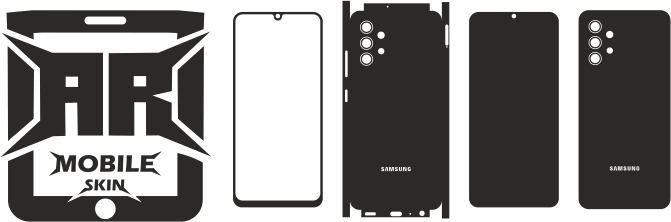
The mobile skin template is an vector image which contains the exact contours of smartphones.
The templates typically contain:
- Back panel outline
- Camera cutouts
- Flashes that open
- Positions of sensors
- Logos and logo areas
These components help designers put together art in a way that the finished design is perfect for the handset.
Check out: Complete Guide to Mobile Skin Templates for beginners
Tools Required for Designing Mobile Skins
Many tools are needed to design mobile skins.
1. Design Software
The vector design software can be used for editing templates.
Some of the most well-known programs are:
- Adobe Illustrator
- CorelDRAW
They allow artists to produce professional-looking artwork.
2. Mobile Skin Template Files
Templates give the exact form of the mobile.
The files typically are accessible in formats like:
- SVG
- DXF
- AI
Templates ensure accurate cutting later.
3. Vinyl Cutting Machine
Once the design has been completed then the skin can be cut with a machine, such as:
- Cricut Maker 3
- Silhouette Cameo 4
The machines cut the vinyl sheets in accordance with the design of the template.
Also read: Best Cutting Machines for Mobile Skin Business
Step 1: Download the Mobile Skin Template
First, download the design template for your smartphone version.
The template includes precise dimensions and cut lines required by the gadget.
The use of accurate templates will ensure that the skin is perfectly fitted.
Step 2: Open the Template in Design Software
Once the template file is downloaded, the file must be opened using Vector Design software.
The templates usually contain many layers, including:
- Schematic of device
- Camera cutouts
- Cutting lines
The layers aid in how design is carried out.
Designers must avoid altering cutting lines in order to preserve precision.
Step 3: Add a Background Design
Next step is to add the graphic design that will show up on the mobile’s skin.
Common design options include:
- Carbon fiber texture
- Marble patterns
- Matte color designs
- Camouflage patterns
The designs are typically placed behind the outline of the template.
Step 4: Align the Design with the Template
A proper alignment is essential to ensure that your design doesn’t hinder camera cutouts or logos.
Template guides can help you make sure that
- The patterns align properly
- Camera areas remain unobstructed
- Important design elements are visible
A careful alignment produces professional-looking skins.
Step 5: Prepare the File for Cutting
When the design is completed after which the design file is ready for cutting.
The most common examples are:
- Converting designs to vector format
- Eliminating layers that are not needed
- Making sure cut lines are clear
The files can be transferred to cutting program.
Step 6: Send the File to the Cutting Machine
The design file gets imported into the software for cutting.
The sheet of vinyl is laid onto the cutting mat and then the cutting machine cuts designs according to design template.
A precise template will ensure that your skin is perfectly cut.
Step 7: Weed the Vinyl Skin
After cutting, the excess vinyl should be eliminated.
The process is known as “weeding”.
While weeding
- Additional vinyl is removed
- The skin’s shape is only a little different.
It is important to take care to ensure that no small pieces are damaged of the style.
Step 8: Apply the Mobile Skin
When the skin is ready the skin can then be applied to the phone.
The typical installation procedure consists of:
- The phone’s surface should be cleaned
- It is important to align the skin properly
- Gently pressing the vinyl
A proper installation will give you a neat and professional end.
Popular Mobile Skin Design Ideas
Numerous creative designs could be utilized in mobile skins.
Popular styles include:
- Carbon fiber skins
- Matte color skins
- Leather texture skins
- Marble pattern skins
- Custom artwork skins
Design-driven designs are a draw for customers on the customizing market.
Benefits of Using Templates for Designing Skins
Templates can be beneficial in the process of designing.
The benefits are:
- Accurate device measurements
- Faster design workflow
- Design errors are reduced
- Professionally-produced Results
Due to these advantages because of these benefits, templates are used extensively by businesses and designers.
Conclusion
The creation of mobile skins is easy when professional templates use templates. Templates offer precise smartphone outline and allow you to develop designs that work perfect.
With the aid of the vector design software as well as vinyl cutting machines and top-quality templates, novices and experts can create attractive and accurate mobile skins.
The demand for customizing smartphones increase, creating mobile skins is crucial for those working that operate in the field of customization for vinyl.
FAQs
What program is employed to create mobile skins?
Software for vector design, such as Adobe Illustrator or CorelDRAW is widely utilized.
Are mobile skin templates necessary for designing skins?
Yes. Templates give the precise dimension of the device required for precise design.
Can beginners design mobile skins?
Yes. Beginning designers can begin designing skins with templates or simple designing software.
What file formats are used for mobile skin templates?
The most popular formats are SVG, DXF, and AI.
Do mobile skin templates work with cutting machines?
Yes. They are specifically designed for use with vinyl cutting machines.