Complete Vinyl Cutting, Vector, and Design Guide for the Samsung Galaxy S20 Skin Template
Overview
A valuable addition to an extensive collection of smartphone skin templates, the Samsung Galaxy S20 is a significant model in the Galaxy S family.A specific Samsung Galaxy S20 skin template is a useful starting point for developing artwork and cutting designs if you want to make custom vinyl skins for this device.
Designers can arrange their artwork around the required device shape by using a model-specific template rather than creating the phone contour by hand. A good template can make the process of making bespoke phone skins easier, regardless of whether you are a graphic designer, DIY artist, Cricut user, Silhouette user, or phone customisation company.
The selection of templates, vector files, design concepts, vinyl cutting, installation, and methods for locating the ideal Samsung model template will all be covered in this book.
What Is a Samsung Galaxy S20 Skin Template?
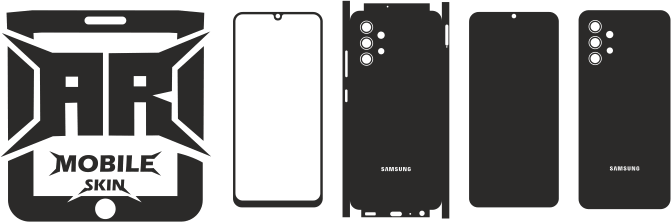
A digital outline or design file used to create a skin for the Samsung Galaxy S20 is called a skin template.
Outlines for the phone’s back panel, camera region, corners, and other pertinent areas may be included, depending on the specific template bundle. Before getting the design ready for cutting, the template can be used as a basis for adding colours, patterns, pictures, text, or unique designs. Make sure the template is meant for the basic Galaxy S20, not the S20+ or S20 Ultra. It is incorrect to presume that both models have the same cutting arrangement because they are different.
Why Make Use of a Specific Galaxy S20 Template?
Your design process can be more structured by using a model-specific template.
1. Cut Down on Hand Drawing
Instead of measuring and sketching every component of the phone yourself, you might start with a predetermined digital outline.
2. Arrange Your Artwork Using a Template
You can arrange graphics and patterns.
3. Prepare Designs for Cutting.
A vinyl-cutting workflow can use compatible template files.
4. Produce Various Designs
Multiple artwork concepts can be supported by the same base template, according to the requirements of the license.
5. Boost Production Reliability
Businesses can replicate their design process for the same phone model with the aid of a standardised starting file.
A template does not ensure a perfect fit; it is merely a starting point. Verify alignment and scaling before creating the finished skin.
How to Create a Personalised Galaxy S20 Skin
You can start making your own artwork as soon as the template opens in suitable design software.
Minimalist Designs: For a straightforward look, use basic colours, straight lines, and subdued patterns.
Customised Name Skins: Create a unique design by adding a name, initials, or other content.
Patterns in Geometry: Make abstract compositions, lines, grids, and repeating shapes.
Gaming-Inspired Artwork: Use your own or permissioned artwork to create unique visuals that are influenced by gaming aesthetics.
Business-Branded Skins: Subject to the template license and artwork rights, create branded designs for a commercial or promotional project.
Textured Visual Styles: Investigate designs influenced by brushed metal, marble, carbon fibre, or other textures. The ultimate look is determined by the material and artwork utilised.
Considerations for the Galaxy S20 Camera Cutout
One of the most crucial components of a phone’s skin design is the camera region.
Make sure the template is meant for the Galaxy S20 and that the camera opening is positioned correctly before cutting.
- Review:
- The location of the camera opening
- Clearance of the flash and sensor
- The borders of the outer skin
- Alignment of artwork
- Orientation and scale
If compatibility has not been confirmed, do not replace the normal S20 template with an S20+ or S20 Ultra template.
Purchasing a Galaxy S20 Skin Template with Cricut:
If you are making your own template, make a test cut and compare it to the real thing before purchasing pricey material. Depending on the file format and your design program, you can integrate a compatible template into a Cricut workflow.
Step 1: Choose the Right Model. Verify that you have the Galaxy S20 template
Step 2: Import the File
Open the file in a cutting process or design program that is compatible.
Step 3: Include Your Artwork
Put your graphics, text, colours, and patterns inside the designated skin boundaries.
Verify the Cut Lines in Step Four
Ensure that artwork elements that should only be printed or exhibited are kept apart from cutting pathways.
Step 5: Check the Scale. Before cutting, make sure the imported measurements are correct.
Step 6: Prepare the Vinyl in Step Six
Select an appropriate material and adhere to the guidelines provided by the maker of the cutting machine.
Step 7: Cut and Weed. Trim any extraneous material from the pattern.
Step 8: Examine the Completed Item
Before putting the skin on, check the outline and camera opening.
Using the Silhouette-Based Galaxy S20 Template
A similar process can be used by Silhouette users:
- Choose the appropriate Galaxy S20 template.
- Import it into software that is compatible.
- Include the desired artwork.
- Examine the borders for cutting.
- Verify the scale.
- Get the vinyl ready.
- Weed and cut the design.
- Carefully apply the completed skin.
Before beginning, make sure the file format of the template is supported by your specific software.
Galaxy S20 Skin Vinyl Types
The chosen material affects the final appearance and application technique, while the template establishes the design contour.
Matte Vinyl offers a muted, low-gloss look.
Shiny Vinyl
increases reflection and produces a glossy look.
Vinyl in the Carbon-Fiber Style
provides a sporty, tactile visual appeal. ### Metallic Vinyl
can give the appearance of brightness and reflection.
Printable Vinyl
If the material, printer, and application procedure are compatible, it can be appropriate for custom printed artwork.
Before utilising new materials for a completed customer order, always test them.
Galaxy S20 Skins: Full-Back vs. Partial
A full-back skin makes advantage of more space for visual customisation and graphics.
A partial skin concentrates on particular areas of the gadget.
- Among the potential design strategies are:
- Full-back artwork
- Minimalist accent pieces
- Panels with geometric shapes; personalised name graphics
- Sections with patterns
- Decorative panels in the center
Creating Multiple Designs From One Template. The optimal strategy will rely on your design objectives and the template’s real coverage.
As long as your license allows the intended use, a reusable digital template can accommodate various artwork variants.
- For instance:
- The Galaxy S20 template
- Black minimalist design
- Customised name design
- Abstract geometric design
- Carbon-fiber design
- The design of a business brand
- Personalised illustration
While the artwork evolves, the template stays the initial outline.
When producing a set of designs for the same gadget, this can save time.
Small Business Galaxy S20 Skin Templates
Model-specific templates can be used by phone customisation companies to streamline their product development and manufacturing processes.
A normal process is:
Model selection → template selection → artwork creation → cutting file preparation → vinyl cutting → inspection and application
Companies can save distinct template files for every model that is supported and arrange them according to device generation, manufacturer, and series.
Examine the commercial license before selling skins created using a template. Additionally, confirm that your intended usage of logos, characters, photos, and other third-party materials is permitted.
Typical Galaxy S20 Template Errors
### Selecting the Incorrect Model The normal S20, S20+, and S20 Ultra are different models. Choose the appropriate template.
### Importing at the Incorrect Scale: Verify the file’s dimensions after importing it.
### Ignoring the Camera Area
Before cutting, check the opening and its surroundings.
Putting Crucial Artwork Too Near the Edge: Keep crucial design components inside the designated cutting border.
### Ignoring a Test Cut
Before production, a test cut might be used to find alignment or scale issues.
Applying the Skin to a Dirty Surface: The final look and adherence may be impacted by dust and grease.
Installation Advice for Galaxy S20 Skin
A better outcome can be obtained by applying the vinyl carefully after it has been cut.
- Clean the surface that will be used.
- Get rid of fingerprints and dust.
- After positioning the skin, firmly push it down.
- Align the camera opening and the edges.
- Apply the film gradually.
- Use the proper application technique to smooth the surface.
- Examine the final product.
Do Galaxy S20 Skins Protect the Phone? Adhere to the vinyl manufacturer’s directions, particularly when working with rough materials or curved sections.
The main purposes of a vinyl skin are surface-level coverage and customisation. It might lessen slight cosmetic wear on covered areas, depending on the material.
A skin, however, should not be regarded as a substitute for an impact-protection case or as a guarantee against damage and scratches.
Manual Measurement vs. Samsung Galaxy S20 Skin Template
It might be necessary to measure the device, sketch the contour, position camera holes, and test the cutting pathways in order to create a template by hand.
This initial labour can be minimised by using a specific Galaxy S20 template as a digital starting point.
Before creating a final skin, you still need to confirm the proportions, scale, cuts, and fit.
What is a skin template for the Samsung Galaxy S20?
Can I use a Galaxy S20 template with Cricut?
It’s a digital design template designed to assist in making a vinyl skin for the basic Samsung Galaxy S20.
Yes, provided that your Cricut setup is compatible with the file format and design workflow.
Can I use Silhouette with the template?
In appropriate Silhouette workflows, compatible files can be utilised. Before importing, make sure the software is compatible.
Are the templates for the Galaxy S20 and S20+ identical?
Don’t think they can be used interchangeably. Choose a template designed just for the phone model.
Which file formats might be present?
Formats may include SVG, EPS, DXF, CDR, PDF, or PNG, depending on the product package. Verify the product page’s actual formats.
Is it possible to alter the Galaxy S20 template?
Yes. You can add colours, text, patterns, and graphics by starting with a suitable design. Can I use the same template to make different designs?
Yes, provided that the relevant licence is in place. Variations of artwork can be created with the same basic outline.
Is it possible for me to sell skins created using the template?
The conditions of the template’s license and the rights to any additional artwork used determine whether it can be used for commercial purposes.
Does a protective case become replaced with a vinyl skin?
No, the main purpose of a skin is surface-level coverage and customisation, not impact protection.
How can I make sure I don’t cut the incorrect template?
Before beginning, make sure the model name is correct and match the information in the template with your device.
Concluding Remarks
A Samsung Galaxy S20 skin template offers a useful starting point for making personalised vinyl skins and getting cutting files ready.
Designers can establish a more structured and consistent manufacturing process by choosing the appropriate model, verifying the file format and scale, and closely examining the camera opening.

You Might Also Like
How to Use Cricut for Cutting Mobile Skin Templates (Complete Beginner to Pro Guide)
iPhone 16 Plus Skin Template – Complete Guide for Vinyl Cutting, Customization, and Mobile Skin Businesses (2026)