
Vinyl Skin Template Vector Files: A Comprehensive Guide to Samsung Skin Templates
Overview
There are many different models, sizes, camera configurations, and body styles of Samsung smartphones. These variations make it necessary to do more than just cut a rectangle of vinyl to create a professional phone skin.
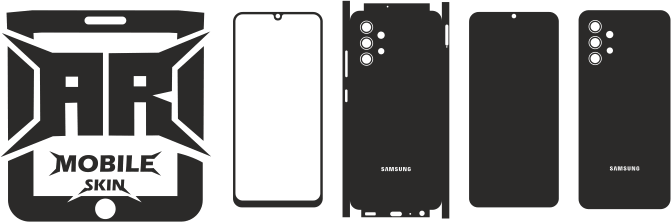
Designers and vinyl installers can use a **Samsung skin template** as a model-specific cutting guide to make skins that fit the intended shape of the phone.
Accurate template files may greatly simplify the design and cutting process, whether you run a vinyl-cutting business, build bespoke phone skins as a hobby, or create unique smartphone designs for clients.
For many smartphone models, ARMobileSkin offers mobile skin template materials made to facilitate creative workflows.
Individual model templates can be arranged into a comprehensive library of Samsung skin templates, ranging from Galaxy S devices to Galaxy A, Note, and other Samsung series.
Samsung Skin Template: What Is It?
A digital cutting/design template made specifically for a specific Samsung smartphone model is called a Samsung skin template.
The template can give the fundamental shape required to create a vinyl cover while taking into consideration crucial details like:
Dimensions of the phone body
Rounded edges
Openings for cameras
The placement of edges
Button sections
The arrangement of the back panel
Additional model-specific cuts
A specific template offers a place to start when making the artwork, as opposed to measuring the phone by hand and designing the shape from scratch.
Each template bundle has its own set of features and file formats.
—
What Makes a Model-Specific Samsung Skin Template Useful?
Over the years, Samsung has introduced a number of smartphone models, and even smartphones in the same series may differ in terms of size and camera configuration.
Because of this, it’s crucial to use the appropriate model-specific template.
Improved Accuracy of Design
You can create your artwork in a set space by using a template.
Vinyl Cutting Made Easier
With the right tools and software, the template can be utilised as part of the cutting process after the design is ready.
Quicker Production
Every time a designer wants to develop a new skin, they don’t have to duplicate the phone outline.
Reliable Outcomes
When creating several designs for the same phone model, companies can stay consistent by using a standardised template.
Simpler Personalisation
The basic phone shape can be used to produce a variety of artwork.
Samsung Skin Templates for Various Galaxy Series
Samsung has a number of significant product families in its smartphone lineup.
As a result, distinct content clusters can be created from a robust collection of Samsung skin templates.
Skin Templates for Samsung Galaxy S
One of Samsung’s most well-known smartphone families is the Galaxy S series.
For many Galaxy S models and generations, unique templates can be made.
Examples consist of:
- Skin templates for the Galaxy S series
- Skin templates for the Galaxy S Plus
- Skin themes for the Galaxy S Ultra
- The older models of the Galaxy S
- More recent models of the Galaxy S
When a matching template is available, each model should preferably have a separate page.
Skin Templates for Samsung Galaxy A
A wide variety of Samsung smartphones are included in the Galaxy A series.
Well-known A-series models may play a significant role in a cluster of Samsung template content.
Examples consist of:
– Galaxy A50 skin template
- The skin template for the Galaxy A51
- The skin template for the Galaxy A52
- The skin template for the Galaxy A53
- The skin template for the Galaxy A54
- The skin template for the Galaxy A55
- Other variants of the Galaxy A
Each significant model may have a separate article or product page for SEO purposes that points back to the primary Samsung skin template category.
Skin Templates for Samsung Galaxy Notes
Even though Samsung’s product strategy has changed, consumers who are interested in more traditional Samsung models continue to favour Galaxy Note smartphones.
Models like this can be found in a Note template cluster:
- The Galaxy Note 8
- The Galaxy Note 9
- The Galaxy Note 10
- The Galaxy Note 10 Plus
- The Galaxy Note 20
- The Galaxy Note 20 Ultra
Instead of looking through a huge collection, customers may locate the exact template they require on a page dedicated to each model.
Skin Templates for the Samsung Galaxy Z Fold and Z Flip
Another design problem is presented by Samsung’s foldable phones.
Skin templates for foldable devices must take into consideration the unique device design because they differ physically from conventional smartphones.
Among the possible content clusters are:
- Skin templates for the Galaxy Z Fold
- Skin templates for the Galaxy Z Flip
- Templates for foldable phone vinyl
- Design guides for Samsung foldable skin
- Installation instructions for foldable phone skins
These pages may develop into a distinct cluster of Samsung foldable templates.
The Significance of Camera Cutouts
One of the most crucial components of a phone skin template is the camera region.
The camera configurations on various Samsung devices can vary greatly.
Therefore, rather than regarding every Samsung phone as having the same shape, a template must take into consideration the required camera area.
Make sure the template matches the precise Samsung model you are working with before creating a skin.
This is especially crucial when two devices have different physical layouts but identical names.
Vector Files for Samsung Skin Templates
Because vector artwork can typically be enlarged and modified without the same kind of pixelation associated with raster graphics, vector-based files are very helpful for cutting and design operations.
Files may be provided in forms like these, depending on the specific template package:
– SVG
– EPS
– DXF
– CDR
– PNG
It is usually advisable to verify the precise formats on the appropriate product or template page.
Modifying artwork, adding graphics, changing colours, and preparing designs for various cutting systems can all be made simpler with a vector process.
Using Cricut with Samsung Skin Templates
Small companies and do-it-yourself artists frequently employ Cricut machines for vinyl creations.
This is an example of a common workflow:
Step 1: Choose Your Model of Samsung
Prior to starting the project, select the precise phone model.
Open the Compatible Template in Step Two
Open your design programme and import the relevant template.
Step 3: Produce Your Artwork
Add:
- Colours
- Patterns
- Logos
- Text
- Visuals
- Decorative components
Get the Cutting File Ready in Step Four
Before submitting the file to the cutting software, make sure the artwork and cutting lines are arranged correctly.
Cut the Vinyl in Step Five
After loading the proper vinyl material, cut it.
Step 6: Clean Up the Design
Unwanted vinyl should be removed from the cut design.
Apply the Skin in Step Seven
After cleaning the phone’s surface, carefully place the completed skin.
Samsung Silhouette Machine Skin Templates
With suitable Silhouette cutting equipment, Samsung templates may also be integrated into workflows.
The general procedure is comparable:
1. Choose the appropriate Samsung model.
2. Bring the template in.
3. Get the artwork ready.
4. Examine the cutting lines.
5. Put the vinyl on.
6. Forward the design to the cutter.
7. The vinyl should be weeded.
8. After the skin is completed, apply it.
Always be sure the design software and file format you have chosen are compatible with your particular computer.
Samsung Professional Vinyl Cutter Templates
Professional vinyl-cutting companies can also benefit from Samsung skin templates.
Depending on the tools and process, designers could use expert cutting systems like:
- Graphtec
- Roland
- Summa
- Additional vinyl cutters that work well
By arranging the appropriate model templates, professional users can establish repeatable production workflows.
When creating several phone skins for clients, this might be really helpful.
Types of Vinyl for Samsung Phone Skins
The cutting shape is determined by the template, but the visual appearance and installation experience are mostly determined by the vinyl.
Depending on the project, designers might use materials like:
Matte Vinyl
A clean, subtle look is produced by a matte finish.
Shiny Vinyl
Gloss finishes provide the appearance of being brighter and more reflecting.
Vinyl in the Carbon-Fiber Style
Materials in the carbon fibre style can produce a textured look reminiscent of an automobile.
Metallic Vinyl
For designs that are more striking, metallic materials can be utilised.
Printable Vinyl
Depending on the material and printer configuration, designers can produce highly customised images using printable materials.
Always refer to the cutting and application guidelines provided by the manufacturer.
Ideas for Samsung Phone Skin Designs
There are a lot of creative options once the template is ready.
You can produce:
- Samsung skins with minimalism
- Personalised name skins
- Skins bearing a company brand
- Designs with a sports theme
- Skins with patterns
- Skins made of carbon fibre
- Abstract art
- Geometric patterns
- Designs influenced by video games
- Customised visuals
- Luxurious designs with an upscale appearance
Numerous distinct graphic concepts can be built upon the same phone framework.
Samsung Skin Templates for Small Enterprises
Additionally, small-scale commercial manufacture can be supported using Samsung skin templates.
For well-known Samsung models, a designer can compile a library of templates and then provide various designs for clients.
For instance, a small company might provide:
**Customer chooses phone → Customer chooses design → Design is ready → Vinyl is cut → Skin is shipped or installed.
This method can assist in creating a production workflow that is reproducible using digital templates.
The license conditions linked to the template files and any third-party artwork used in the design should always be adhered to when using them for commercial purposes.
Manual Measurements vs. Samsung Skin Templates
It can take a long time to create a phone skin using manual measurements.
A specific digital starting point is offered by a particular template.
Manual Approach
- Measure the phone.
- Create the outline.
- Calculate curves
- Mark the locations of the cameras
- A test cut
- Modify
- Repeat
Template-Based Approach
- Choose the model.
- Launch the template.
- Make the artwork
- Get the cut file ready.
- Cut the vinyl.
- Put the skin on
Although they can greatly streamline the design process, templates do not remove the requirement for testing and cautious installation.
How to Prevent Selecting the Incorrect Samsung Template
Choosing a template only based on the phone’s name is one of the most frequent errors.
Prior to downloading or buying a template, confirm:
- The precise model name
- The creation of models
- A variation
- The placement of the camera
- Dimensions of the device
- Compatibility of templates
- The file formats that are included
If you’re not sure, check the details on the template page and the model information displayed on your phone.
Installation Advice for Samsung Skin Templates
Making the cut file is just one step in the procedure.
The final appearance can be significantly altered by a well-executed installation.
Make the Surface Clean
Before applying, get rid of any impurities including oil, dust, and fingerprints.
Take Care When Positioning
Avoid pressing down on the entire skin right away. Align the primary cutting sections and edges first.
Take Your Time
Wrinkles and trapped air might result from applying vinyl too soon.
Employ Proper Application Methods
A squeegee or other appropriate application tool may be helpful during installation, depending on the material.
Examine the Camera Area
Before completing the application, make sure the camera opening is correctly positioned.
Typical Errors with Samsung Skin Templates
Making Use of the Incorrect Model
A Samsung phone that looks similar does not always use the same template.
Ignoring Variations in Cameras
Models can have quite different camera setups.
Creating Outside of the Cutting Area
The planned cut boundaries should not be crossed by artwork.
Ignoring the Thickness of Material
During cutting and installation, different vinyl materials may exhibit distinct behaviours.
Using Without Cleaning
Adhesion and appearance might be impacted by oil and dust.
Anticipating a Skin to Take the Place of a Case
The main purposes of a vinyl skin are surface-level coverage and customisation. It is not comparable to an impact-resistant phone case.
Create an Entire Library of Samsung Skin Templates
Arrange material according to distinct device families for a powerful Samsung template collection.
An effective structure might resemble:
- Skin Templates for the Galaxy S
- Skin Templates for the Galaxy A
- Skin Templates for the Galaxy Note
- Fold Skin Templates for the Galaxy Z
- Flip Skin Templates for the Galaxy Z
- Templates for Specific Samsung Models
- Samsung Cricut Instructions
- Samsung Silhouette Guides
- Design Guides for Samsung Vinyl
This gives users several options to find the appropriate template and establishes a robust topical organisation.
Who Is Able to Utilise Samsung Skin Templates?
Samsung skin templates are helpful for:
- DIY vinyl enthusiasts
- Users of Cricut
- Users of silhouettes
- Businesses that cut vinyl
- Designers of graphics
- Shops that customise phones
- Businesses that deal with signs and graphics
- Businesses that sell promotional products
- Businesses that offer personalised gifts
- Expert skin installers
Depending on the user’s equipment and design specifications, the same digital template can support several workflows.
Common Questions
What is a template for a Samsung skin?
A digital design and cutting template made for a certain Samsung smartphone model is called a Samsung skin template.
Is it possible to utilise Samsung skin templates with Cricut?
When the file format and design software are compatible, it is possible to integrate compatible template files into Cricut workflows.
Can I use Silhouette with Samsung templates?
Yes. If the necessary file format is supported, compatible files can be utilised in appropriate Silhouette workflows.
Does the same skin template work with all Samsung phones?
No. The sizes, camera configurations, and body forms of various Samsung models can vary. It is important to utilise the appropriate model-specific template.
Is it possible to alter a Samsung skin template?
Yes. Depending on the file type and programme, a template can typically be used as the basis for adding colours, patterns, pictures, text, and other artwork.
Can a company use Samsung skin templates?
Commercial use may be possible, but it will rely on the licensing conditions of the particular template and any artwork included in the finished product.
Do Samsung skin templates offer protection for phones?
Although a vinyl skin might offer customisation and surface-level coverage, an impact-protection case should still be used.
Which Samsung models should I search for?
Instead of selecting a template based solely on the Galaxy series, it is important to look up the actual Samsung model you own.
What makes camera alignment crucial?
The camera area must continue to be reachable and positioned correctly. The locations and shapes of the cameras can vary throughout Samsung models.
Is it possible to use a single Samsung template for several different phone models?
Since minor variations in size and camera position might have an impact on the final fit, you should typically utilise a template made especially for the particular model.
Concluding Remarks
For anyone creating an extensive collection of mobile skin templates, Samsung offers a significant opportunity.
A better content strategy is to create distinct clusters around **Galaxy S, Galaxy A, Galaxy Note, Galaxy Z Fold, and Galaxy Z Flip**, followed by specific pages for each model, rather than considering Samsung templates as a single, large category.
With this method, consumers can easily navigate from the general Samsung category to the precise template they require.