What Files Are Included in Mobile Skin Template Downloads?
Mobile skins are now one of the top options for personalizing phones while safeguarding them from scratches as well as everyday wear. If you’re a professional seller of skins or a proprietor of a print shop, or even a hobbyist with cutting equipment such as Cricut or Silhouette, mobile skin templates are essential to create perfect cut skins.
However, many newbies have a difficult question to answer: What files are really included in a mobile skin template?
Knowing the types of files used in a Mobile Skin Template download could assist you with designing, cutting, and applying skins effectively. In this article, we go over all of the popular types of files found with mobile skin template downloads and the way they can be used.
Platforms such as ArMobileSkin.com provide professionally created mobile skin templates that are compatible with many smartphone models, making it simpler for skin companies and designers to design high-end skins in a short time.
Understanding Mobile Skin Template Files
The downloads for mobile skin templates usually comprise the format of vector files that work with different cutting and design software. The files are designed precisely so that the designs can be perfectly adapted to phones.
Contrary to images that are simple, vector images allow for editing, resizing, as well as exact cutting that is crucial in the creation of vinyl skins.
The majority of template companies, like ArMobileSkin.com, include multiple formats of files so that users can utilize their preferred programs.
Common Files Included in Mobile Skin Template Downloads
Here are the top formatted files that you can get when you download the Mobile skin template templates.
1. AI File (Adobe Illustrator File)
It is the AI document is among the main files available in the mobile skin templates downloaded.
Features of AI Files
- Designed for Adobe Illustrator
- Vector formats that are fully editable
- High-precision cutting pathways
- Easy customization for designers
Why It Is Useful
Designers typically employ AI documents for:
- Create custom patterns and textures
- Modify skin shapes
- Make sure cut lines are adjusted
- Prepare designs for printing
Since it’s the Vector format, this permits the lossless scaling of a structure without loss.
2. SVG File (Scalable Vector Graphics)
The SVG file is a popular one. SVG image file is extensively used in cutting equipment such as Cricut Silhouette as well as Brother ScanNCut.
Benefits of SVG Files
- compatible with Cricut Design Space
- Ideal for cutting vinyl
- Lightweight and adaptable
- Simple to integrate into many design programs
Who Uses SVG Files?
SVG files are employed by
- DIY skin creators
- Small vinyl businesses
- Users of the Cricut machine
- Custom phone skin designers
A lot of people like SVG files due to the fact that they are straightforward and easy to cut.
3. DXF File (Drawing Exchange Format)
DXF files are a different format that is often used in mobile skin templates downloads.
Key Features
- It is compatible with Silhouette Studio (Basic version)
- Supports vector cut lines
- The perfect tool for CNC as well as Vinyl cutters.
- It can be opened with many ACAD-related programs.
DXF documents ensure that people who don’t possess access to premium design software are still able to access the design templates.
4. PDF File (Portable Document Format)
A few mobile skin templates downloads also include pdf versions of templates.
Why PDF Files Are Included
PDF files can be helpful in:
- Looking at the layout of the design
- Printing reference manuals
- Verifying alignment prior to cutting
- The sharing of experiences with teammates
Though PDFs are not usually cut directly, they’re extremely useful for guidelines for layout or design.
5. EPS File (Encapsulated PostScript)
It is yet another vector professional file format that can be used in templates and downloads.
Advantages of EPS Files
- Compatible with numerous design programs
- Vector graphics of high quality
- It is easy to integrate into workflows for printing
- It is ideal for large-scale production
The EPS file format is often utilized by professional printing shops as well as designers’ studios.
Additional Files That May Be Included
Certain premium templates also offer additional files that are helpful.
1. Layered Design Guides
Certain templates come with guidebooks with layers that show:
- Front skin placement
- Back skin placement
- Camera cutouts
- Button cutouts
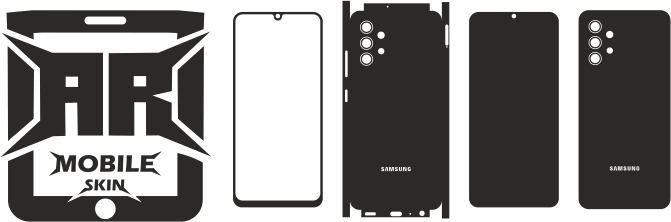
It helps the designers know exactly what the phone’s skin should look like. the phone.
2. Cut Line Guides
Guidelines for cutting are very crucial for cutting vinyl.
The following guides can be helpful to users:
- Maintain correct cutting boundaries
- Prevent misalignment
- Find the perfect fit for your skin
3. Readme or Instruction File
A few downloads come with a Readme document, which explains:
- Templates: How do you use them?
- Recommendations for software
- Setting up the cutting machine
- Vinyl material ideas
This can be particularly helpful to novices who are not familiar with the production of mobile skins.
Why Multiple File Formats Are Included
There is a chance that you are wondering what the reasoning is behind mobile skin template downloads that comprise multiple file types instead of one.
The primary reason for this is the compatibility of the software.
Many users depend on various instruments, for example:
| User Type | Preferred File Format |
| Graphic Designers | AI, EPS |
| Cricut Users | SVG |
| Silhouette Users | DXF |
| Print Shops | AI, EPS |
| Beginners | SVG, PDF |
The availability of multiple formats means that each user is able to use the templates with ease.
Benefits of Using Professional Mobile Skin Templates
The templates that are professionally created offer many advantages over making them by hand.
1. Perfect Device Fit
Professional templates are developed with exact measurements from devices, making sure that the skins will fit precisely.
2. Time Saving
Businesses and designers can cut down time by utilizing already-made templates, instead of using measuring equipment themselves.
3. Easy Customization
Vector files let designers:
- Include texture
- Incorporate logos
- Create custom graphics
- Change the layout of elements
4. Compatible With Cutting Machines
Many templates run smoothly on equipment like:
- Cricut
- Silhouette
- Roland
- Graphtec
- Brother ScanNCut
Where to Download High-Quality Mobile Skin Templates
If you’re looking for high-quality mobile skin templates, ArMobileSkin.com offers an extensive selection of download templates for a variety of mobile brands.
The platform offers templates for:
- Samsung devices
- iPhone models
- Google Pixel phones
- Xiaomi smartphones
- Other popular devices
Each template comes with precise cut lines as well as different format options for files that make it perfect for print shops, graphic designers, as well as vinyl cutting companies.
Tips Before Using Mobile Skin Template Files
When you begin your mobile skin design project, be sure to keep these guidelines in mind.
1. Use Vector-Based Software
Software that works like this is the best
- Adobe Illustrator
- CorelDRAW
- Cricut Design Space
- Silhouette Studio
2. Test Cut First
Always conduct the trial cut of vinyl prior to mass production in order to make sure that the alignment is correct and the settings for the machine.
3. Use High-Quality Vinyl
To get the most effective result, try:
- Premium adhesive vinyl
- Skin materials that are bubble-free
- Lamination for durability
4. Check Device Model Carefully
Always check that you have the precise model of the phone prior to cutting off the skin in order to prevent a mistaken fit.
The Future of Mobile Skin Templates
As the customization of smartphones is growing, the need for mobile skin templates has been growing rapidly.
As more and more people enter the custom-made vinyl industry and cutting equipment at home, printable templates are now a must-have tool to use for:
- Online skin stores
- Printing shops locally
- DIY creators
- Online sellers of products
Platforms such as ArMobileSkin.com are helping designers by providing templates that streamline the entire creation and cutting procedure.
Conclusion
Downloads of mobile skin templates include various important formats for files that allow the design and cutting process to be much simpler and more effective. The most common formats are AI, SVG, DXF, and EPS formats, as well as PDF documents that each serve various purposes based on the cutting software and machines being utilized.
The ability to use various formats allows compatibility with diverse tools, from high-end design software to DIY cutting equipment such as Cricut or Silhouette.
Entrepreneurs, designers, or DIY makers who want to begin or expand their mobile skin-related business can download professionally-designed templates on ArMobileSkin.com and significantly simplify the process while ensuring the highest-quality output.
FAQs About Mobile Skin Template Downloads
1. Which file format works ideally for Cricut mobile skin-cutting?
The SVG format file is the ideal choice for Cricut machines as it integrates in conjunction with Cricut Design Space and maintains precise cuts.
2. Can I edit mobile skin template files?
Yes. A majority of templates can be described as vector-based this means that they are editable by using programs such as Adobe Illustrator or CorelDRAW.
3. Are mobile skin template downloads compatible with Silhouette Studio?
Yes. file formats, such as DXF or SVG, can be used extensively in conjunction with Silhouette Studio. This allows users to cut perfectly-cut skins.
4. Do mobile skin templates include camera and button cutouts?
Yes. Professional templates have exact cutouts of flash modules, camera buttons, sensors, and more for a perfect fit.
5. Can beginners use mobile skin template files?
Absolutely. Most templates are easy to use and are compatible with simple cutting programs like Cricut Design Space and Silhouette Studio.
6. Where can I download professional mobile skin templates?
Download high-quality templates on ArMobileSkin.com, which has a large selection of mobile skin templates to suit a wide range of smartphones.

You Might Also Like
Samsung Galaxy S24 Ultra Skin Template – Complete Guide to Professional Vinyl Cutting Templates, Premium Phone Skins & Business Growth (2026)
How to Apply Camera Skins Without Bubbles (Step-by-Step Guide)